/
Assign a Currency to a Customer
Assign a Currency to a Customer
- Former user (Deleted)
- Andres Toledo
Owned by Former user (Deleted)
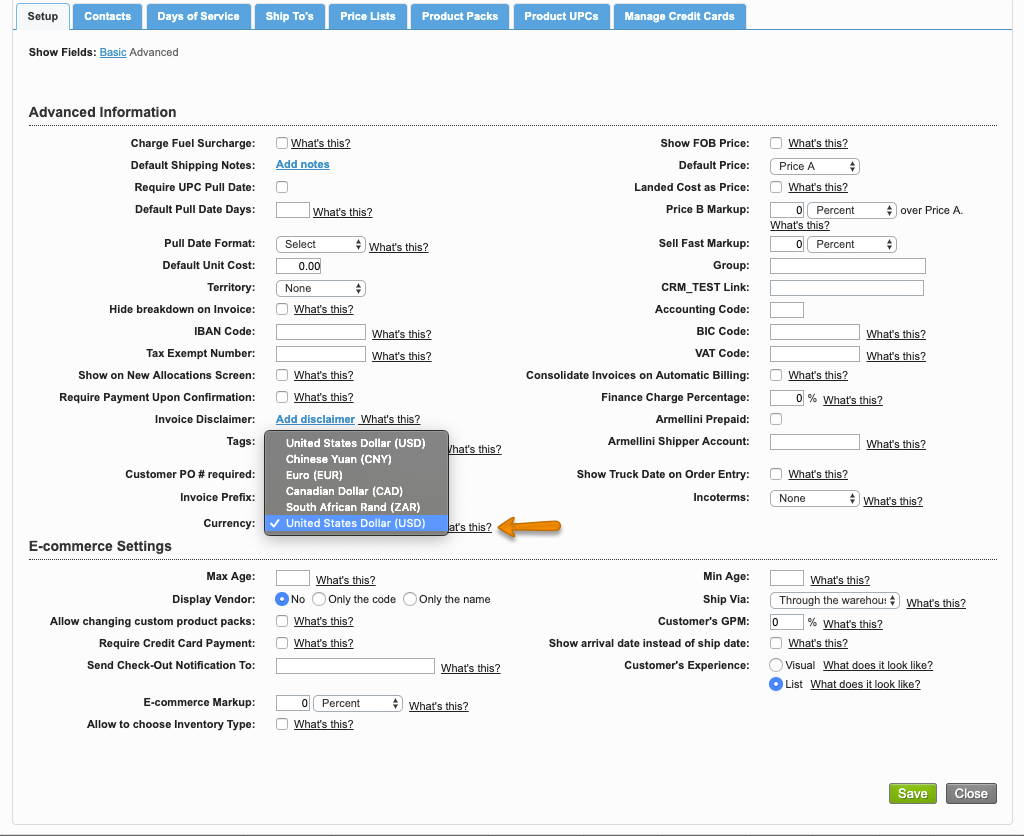
Companies with the multi-currency option enabled can set up a different currency for each customer. Once enabled, all the transactions made for this customer will display the total in both your company currency and in your customer's currency according to the exchange rate set up at the time of the transaction.
Instructions
Related Articles
Information
This option currently works for Euro, United States Dollar, Chinese Yuan, and South African Rand. Remember to review the shopping car before you place the order!
We've encountered an issue exporting this macro. Please try exporting again later.
Related content
Multicurrency for Sales
Multicurrency for Sales
More like this
Exchange Rate and Multi-Currency Setup
Exchange Rate and Multi-Currency Setup
More like this
Assign a Currency to a Vendor
Assign a Currency to a Vendor
More like this
Multi-currency - Accounts Payable
Multi-currency - Accounts Payable
More like this
Assign Costs in Foreign Currency to Standing Orders
Assign Costs in Foreign Currency to Standing Orders
More like this
Exchange Rate for Purchasing Modes
Exchange Rate for Purchasing Modes
More like this