/
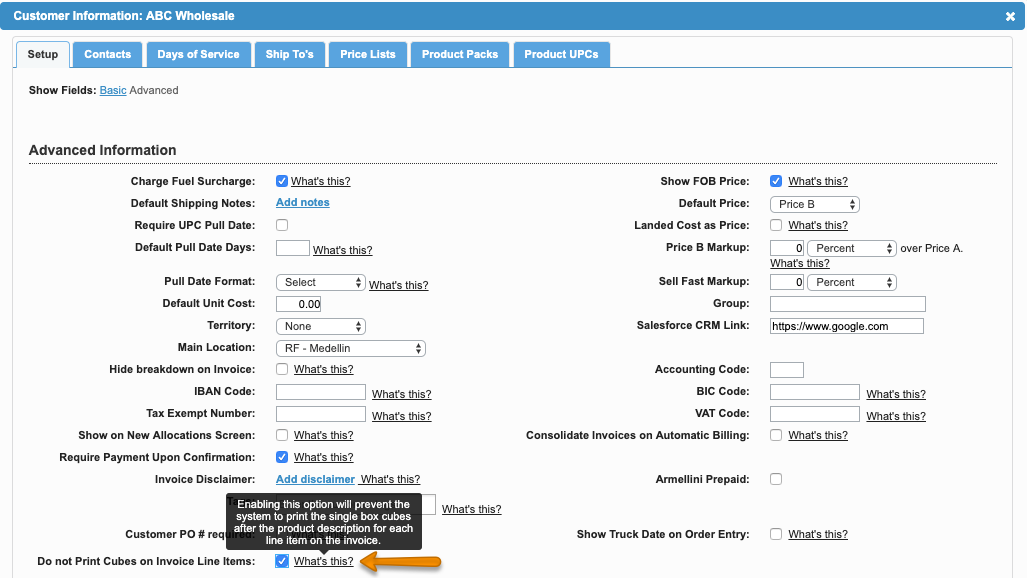
Do not print Cubes on Invoice Item Lines
Do not print Cubes on Invoice Item Lines
- Former user (Deleted)
- Andres Toledo
- Former user (Deleted)
Owned by Former user (Deleted)
Last updated: Dec 04, 2023 by Andres Toledo
Overview
The system allows to make exceptions per customer so the total cubes per line are not printed on invoices.
Important
This option will only be enabled if the setting Print Cubes on Invoice Item Lines has been enabled for the whole company. For further information read Print Cubes Information on Invoices.
Instructions
Related Articles
We've encountered an issue exporting this macro. Please try exporting again later.
, multiple selections available,
Related content
Print Cubes Information on Invoices
Print Cubes Information on Invoices
More like this
Allow Printing Invoices On Shipping Screens
Allow Printing Invoices On Shipping Screens
More like this
Don't Mark Orders as Printed when the Sales Team Prints them
Don't Mark Orders as Printed when the Sales Team Prints them
More like this
Print Invoices from Shipping - Order Summary
Print Invoices from Shipping - Order Summary
More like this
Order Summary: Filter and Print Invoices
Order Summary: Filter and Print Invoices
More like this
Invoice and Credit Line Numbers
Invoice and Credit Line Numbers
More like this