/
CRM Link
CRM Link
- Former user (Deleted)
- Andres Toledo
Owned by Former user (Deleted)
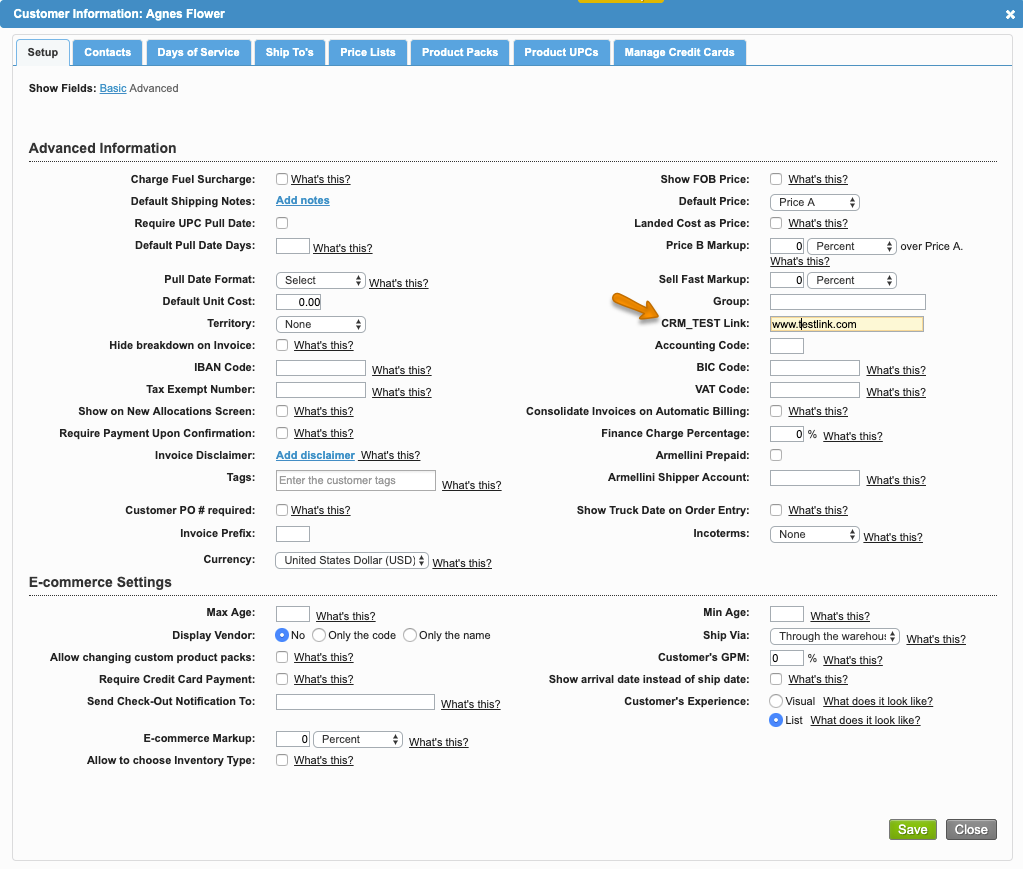
Komet Sales gives you the option to enter the customer specific CRM link within the Advanced settings of the Customer Komet Sales account. Adding this link, allows the salesperson to access it during the creation of an invoice order within the Order Entry screen.
Information
To enable this option, please refer to Direct Customer CRM Account Access.
Instructions
Related Articles
Information
The system will not display any CRM information when creating the invoice for the customer if the Customer account does not have a CRM Link set in the "Advance" setup of their Komet Sales account.
We've encountered an issue exporting this macro. Please try exporting again later.
Related content
Direct Customer CRM Account Access
Direct Customer CRM Account Access
More like this
Invoice Options
Invoice Options
More like this
Upload External Invoices Into Komet Sales
Upload External Invoices Into Komet Sales
More like this
Add a new Customer to Komet Sales
Add a new Customer to Komet Sales
More like this
Setup User Options
Setup User Options
More like this
External Accounting System integration with Komet Sales
External Accounting System integration with Komet Sales
More like this