/
Display GPM Tooltip
Display GPM Tooltip
- Former user (Deleted)
- Andres Toledo
Owned by Former user (Deleted)
Overview
The GPM information from company and customer account dashboards can be customized. This article explains how to show or hide the GPM tooltip.
GPM Tooltip Disabled
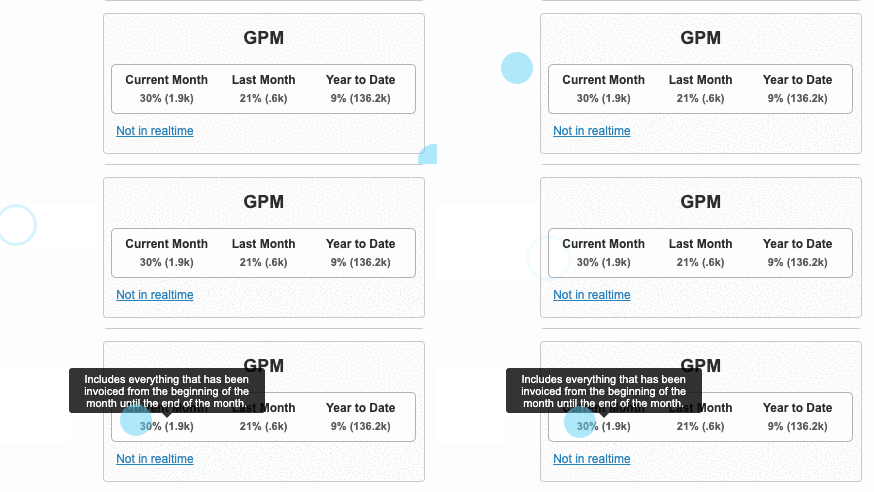
When the option to display the GPM tooltip is unchecked, the next information will be displayed on the GPM widget, available from the sales dashboard, providing generic information:
GPM Tooltip Enabled
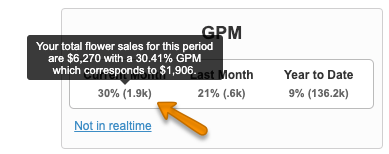
When the option to display the GPM tooltip has been enabled, the next information will appear:
Instructions
Related Articles
Only Admins have access to enbale or disable this option.
We've encountered an issue exporting this macro. Please try exporting again later.
Related content
Set up a Customer's GPM
Set up a Customer's GPM
Read with this
Hide GPM on Dashboards
Hide GPM on Dashboards
More like this
How is the GPM calculated?
How is the GPM calculated?
Read with this
Remove GPM by User
Remove GPM by User
More like this
GPM Notifications
GPM Notifications
More like this
Low GPM Sales Notification Report
Low GPM Sales Notification Report
More like this