/
Require Vendor for Prebooks
Require Vendor for Prebooks
- Former user (Deleted)
- Andres Toledo
Owned by Former user (Deleted)
Last updated: Dec 04, 2023 by Andres Toledo
Overview
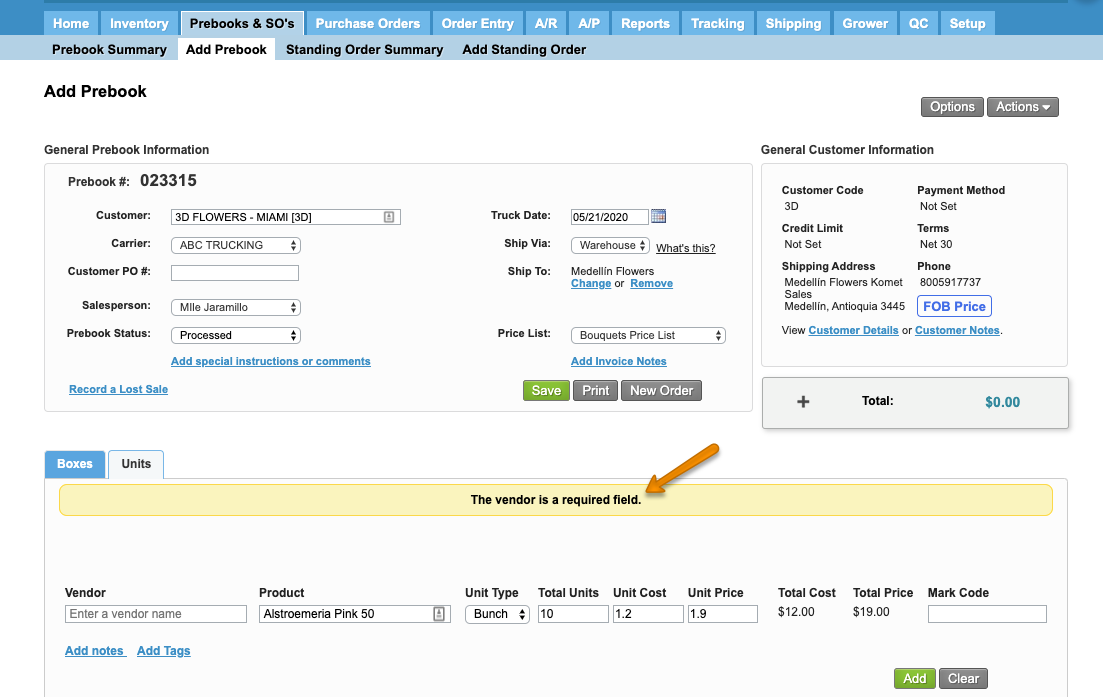
To create a Prebook, the default required fields are Customer, Truck Date and Products. The system allows to make the vendor required for a given user while adding or editing a product in a Prebook.
Instructions
How Does this Option Work?
When this setting has been enabled, the system will require the vendor to add a product line.
Related Articles
Information
For further information on how to delete items from an order, read How to Delete Products from an Order?
We've encountered an issue exporting this macro. Please try exporting again later.
, multiple selections available,
Related content
Manage Prebooks from Vendor Availability
Manage Prebooks from Vendor Availability
More like this
Create a Prebook
Create a Prebook
More like this
Add Items to a Prebook from Future Inventory or Vendor Availability
Add Items to a Prebook from Future Inventory or Vendor Availability
More like this
Quickstart Guide: Prebooks
Quickstart Guide: Prebooks
More like this
Restrict single Item addition to Prebooks
Restrict single Item addition to Prebooks
More like this
Settings - Prebooks & SOs
Settings - Prebooks & SOs
More like this