/
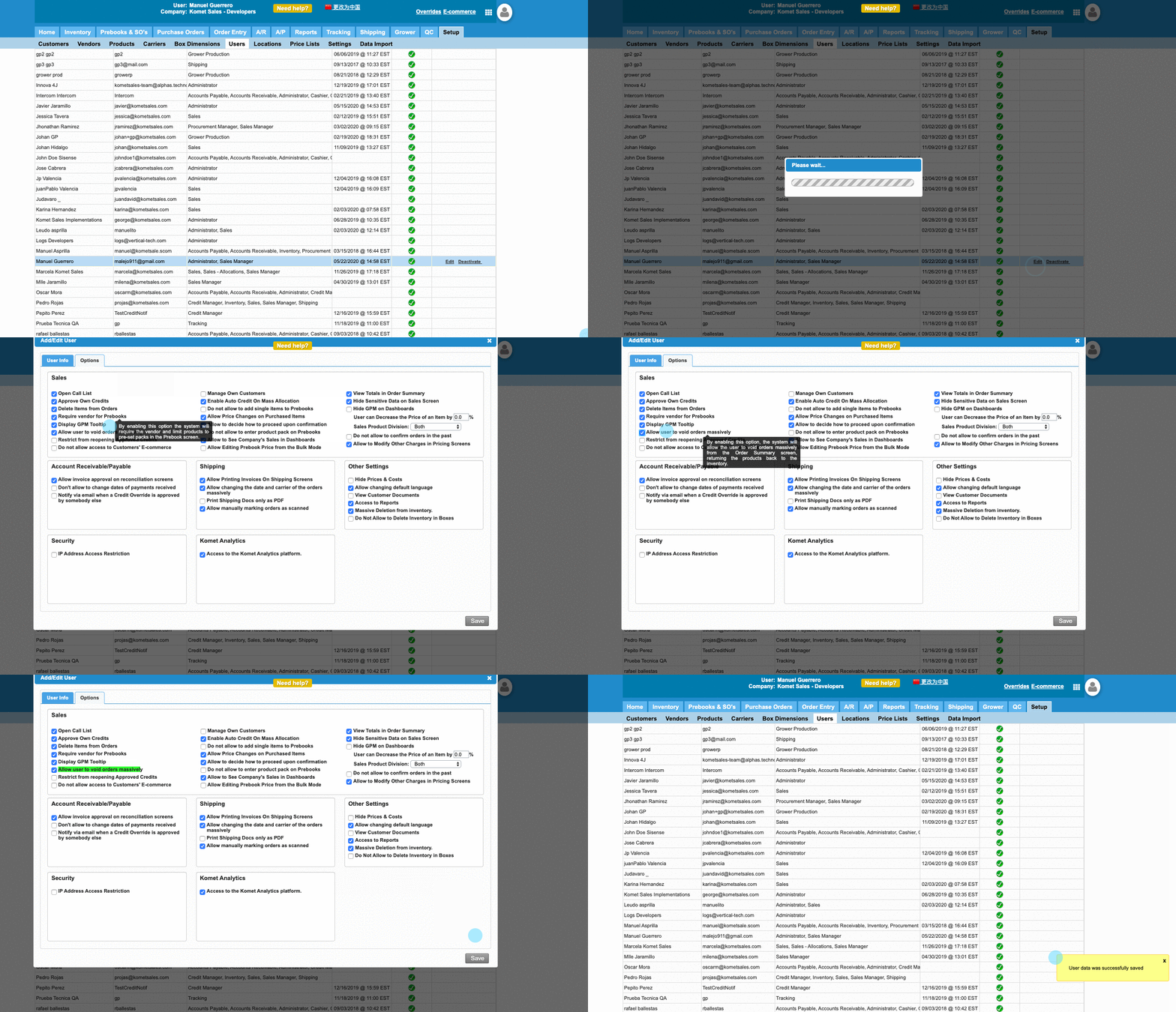
Allow User to Void Orders Massively
Allow User to Void Orders Massively
- Former user (Deleted)
- Andres Toledo
Owned by Former user (Deleted)
Last updated: Dec 04, 2023 by Andres Toledo
Overview
This option, when enabled, will allow the user to void orders massively from the Order Entry screen, returning the products back to the inventory.
Important
Once an invoice is deleted or voided, it cannot be recovered; the items will be sent back to inventory and a new invoice should be created. The voided invoice will remain visible on the Order Summary screen. The invoice will be marked as "Voided" and the totals will be zero for both the box quantity and dollar amount.
Instructions
Related Articles
We've encountered an issue exporting this macro. Please try exporting again later.
, multiple selections available,
Related content
Cancel E-commerce Orders
Cancel E-commerce Orders
More like this
Delete Purchase Orders
Delete Purchase Orders
More like this
Create Future Sales Orders
Create Future Sales Orders
More like this
Manually Add Items to the Inventory
Manually Add Items to the Inventory
More like this
Add Multiple Items to an Invoice
Add Multiple Items to an Invoice
More like this
Inventory Count
Inventory Count
More like this