/
Allow to Modify Other Charges in Pricing Screens
Allow to Modify Other Charges in Pricing Screens
- Former user (Deleted)
- Andres Toledo
Owned by Former user (Deleted)
Overview
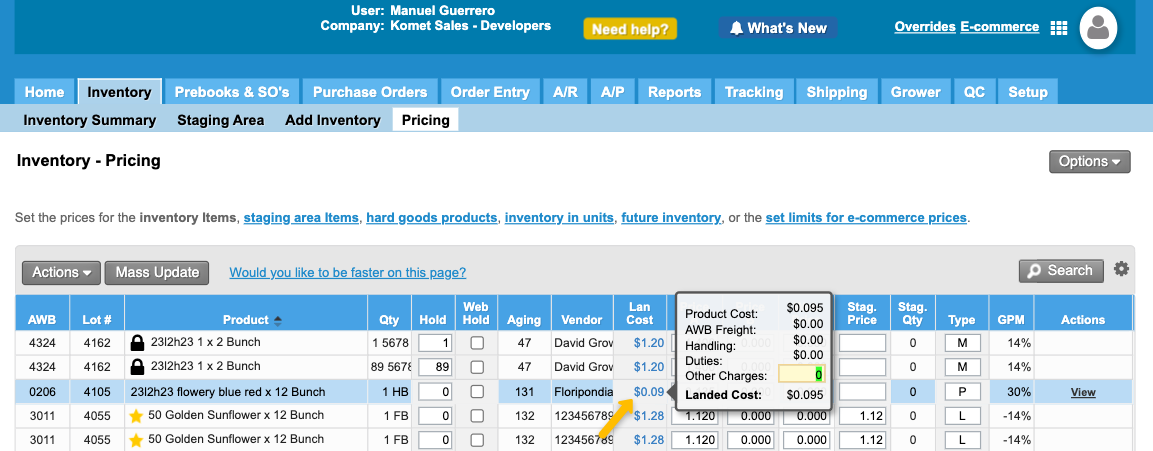
By enabling this option, the system will allow users to edit the Other Charges field, available from the Landed Cost field in the Inventory- Pricing screen.
Instructions to apply a restriction
How does this option work?
Once enabled, the system will allow to edit the Other Charges field once the user over the mouse hover the Landed Cost column.
Related Articles
We've encountered an issue exporting this macro. Please try exporting again later.
Related content
Add Additional Charges to Hard Goods
Add Additional Charges to Hard Goods
More like this
Allowing Vendors to Edit Prices and Costs
Allowing Vendors to Edit Prices and Costs
More like this
Invoice Additional Charges
Invoice Additional Charges
More like this
Price Overrides
Price Overrides
More like this
Add or Edit Additional Charges
Add or Edit Additional Charges
More like this
Additional Charges - Purchase Orders
Additional Charges - Purchase Orders
More like this