/
Hide Sensitive Data on Sales Screen
Hide Sensitive Data on Sales Screen
- Former user (Deleted)
- Andres Toledo
Owned by Former user (Deleted)
Last updated: Dec 04, 2023 by Andres Toledo
Overview
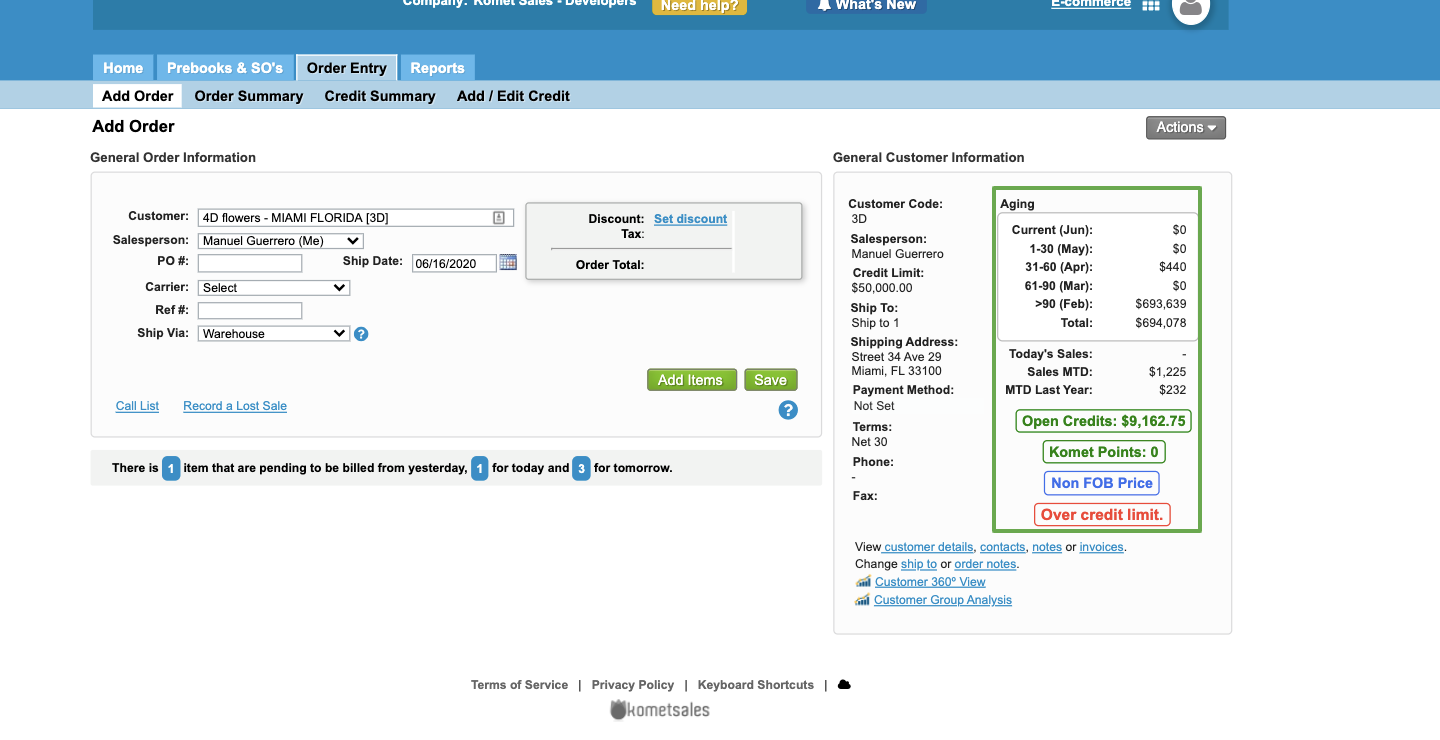
This option allows to determine whether a salesperson can or cannot view the accounting information for a given customer in the Order Entry screens.
What information will be hidden?
Once this option has been checked for a given user, the system will hide for them the Aging, Open Credits, credit limit from the General Customer Information window.
Instructions
Related Articles
We've encountered an issue exporting this macro. Please try exporting again later.
, multiple selections available,
Related content
Hide Products in the E-commerce Availability
Hide Products in the E-commerce Availability
More like this
E-Commerce Settings
E-Commerce Settings
More like this
Display Vendor Name or Code for E-commerce
Display Vendor Name or Code for E-commerce
More like this
E-Commerce Filters
E-Commerce Filters
More like this
Promotions and Messages
Promotions and Messages
More like this
User Roles
User Roles
More like this