/
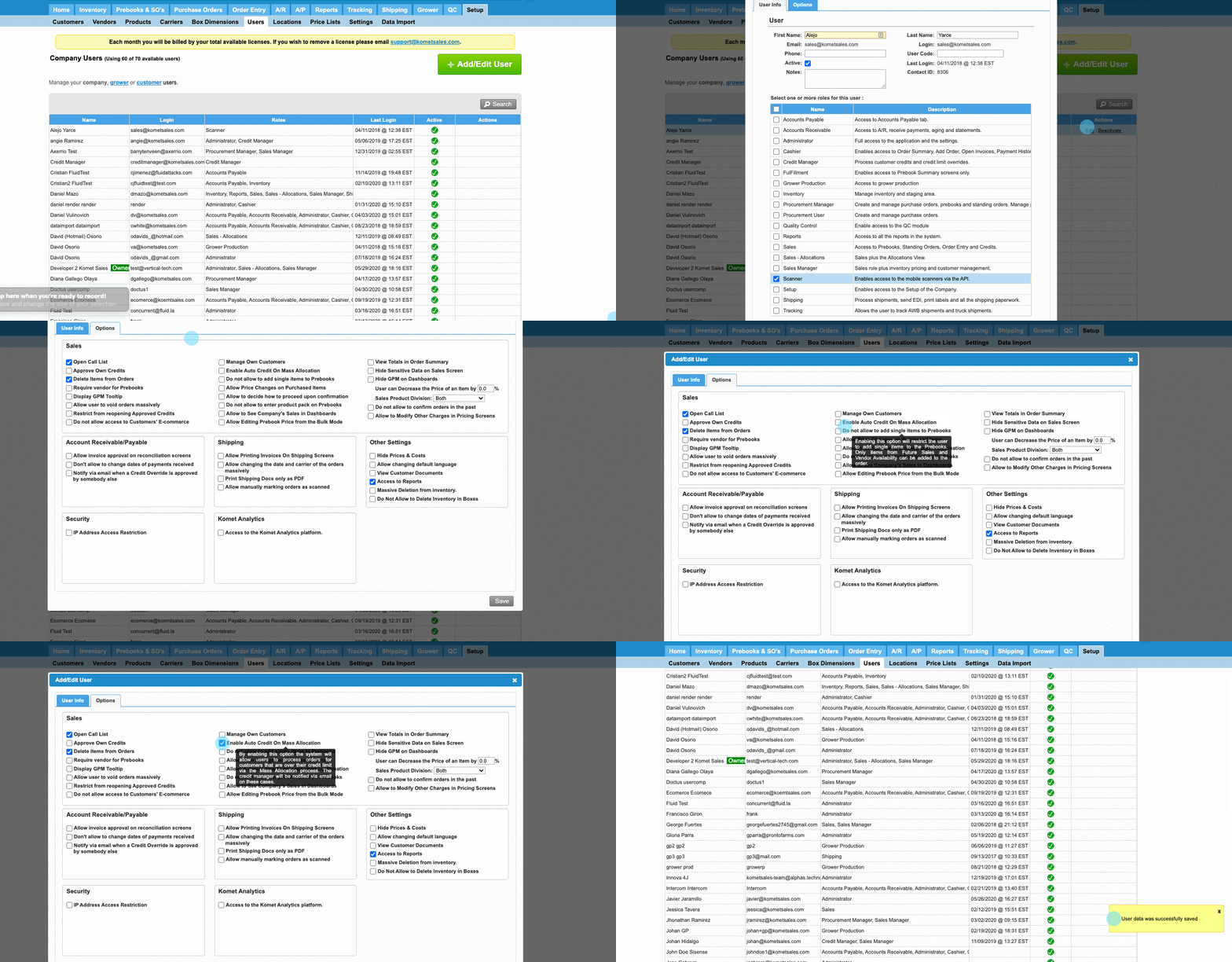
Automatic credit line increase for Mass Allocations
Automatic credit line increase for Mass Allocations
- Former user (Deleted)
- Andres Toledo
Owned by Former user (Deleted)
Last updated: Dec 04, 2023 by Andres Toledo
The system does not allow to create orders for customers that are over their credit limit, however, users with this option enabled will be allowed to make an exception on this so they can bill items through Mass Allocation process to customers that have reached their credit limit.
Information
Once this option is enabled, the system will send a notification to Credit Managers informing that the product was sold to a customer that has reached their credit limit.
Instructions
Related Articles
We've encountered an issue exporting this macro. Please try exporting again later.
, multiple selections available,
Related content
Add Automatic Additional Charges
Add Automatic Additional Charges
More like this
Update Automatic Additional Charges
Update Automatic Additional Charges
More like this
Scheduled Payments Setup
Scheduled Payments Setup
More like this
Payment Terms Setup
Payment Terms Setup
More like this
Advanced Customer Account Setup
Advanced Customer Account Setup
More like this
Set up a Customer's Days of Service
Set up a Customer's Days of Service
More like this